Which cutter
Where to buy| Tool | Cuts | Limit in the Handbook |
|---|---|---|
| Straight snips | Straight lines and large curves; blades sharpened to 85 degrees; sizes 6 to 14 in | Aluminum up to 1/16 in (H-31 p. 4-12) |
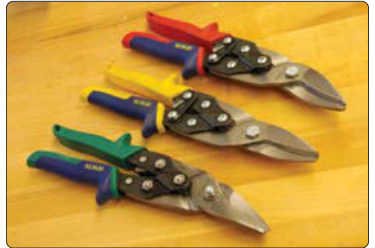
| Aviation snips | Holes, curves, round patches, doublers. Yellow handles cut straight, green curve right, red curve left | Light gauge sheet (p. 4-13) |
| Throatless shear | Straight, curved and irregular cuts; sheet of any length; metal turns freely round the blade | Aluminum up to 0.063 in (p. 4-9) |
| Scroll shears | Irregular lines inside a sheet without cutting through to the edge | p. 4-10 |
| Squaring shear (foot) | Cut to a line, square, or cut several to one size with the backstop | 0.063 in aluminum; powered shears for thicker (p. 4-9) |
| Nibbler (air-powered) | Bites out pieces about 1/16 in wide | Sheets up to 1/16 in thick (p. 4-8) |
H-31 = FAA-H-8083-31B, Airframe Handbook, Chapter 4.
Make a clean cut
| Step | Action | What to do |
|---|---|---|
| 1 | Choose the tool | By cut shape and thickness (table above). Check the blade for cracks on a powered saw; use the foot or powered shear for squaring. |
| 2 | Mark the line | Scribe or mark the cut line. For a squaring shear, place the sheet on the bed with the cutting line even with the cutting edge of the bed. |
| 3 | Cut | On a foot shear, step on the treadle while holding the sheet firmly. On a squaring shear, square one end against the fence, then each edge in turn. |
| 4 | Repeat parts | Set the backstop gauge bar the desired distance from the blade and push each piece against it: all the pieces come out the same size without measuring each one. |
| 5 | Finish the edge | File or smooth rough edges and slivers, then deburr (a file's job is to remove rough edges before the part is installed, p. 4-13). |
Quick check
You must cut a curve that turns to the left in 0.040 in aluminum. Which snips?
- Red-handled aviation snips
Best fit. Red aviation snips curve left; yellow cut straight; green curve right (p. 4-13).
- Green-handled aviation snips
Not this one. Green curves to the right.
- Yellow-handled aviation snips
Not this one. Yellow cuts straight.
On a real job, the SRM decides.
Typical mistakes
| Mistake | What happens | Fix |
|---|---|---|
| Straight snips on a tight curve | Distorted edge | Aviation snips are better for circles and arcs (p. 4-12) |
| Foot shear on thick stock | Blade damage, bad cut | Powered shear above 0.063 in aluminum |
| Loose grip on a power saw | Saw grabs the metal | Keep a firm grip on the handle at all times (p. 4-7) |
| Leaving burrs and slivers | Cracks start at rough edges | File or smooth every cut edge |
Care
Keep blades sharp and aligned, pivots clean, and store hand snips closed. Replace a cracked saw blade before use. Sharpening angles and nibbler dies follow the maker's data.
Questions people actually ask
What does the handle colour mean on aviation snips?
Yellow cuts straight, green cuts to the right, red cuts to the left (p. 4-13).
How thick can I cut with hand snips?
The Handbook gives straight snips up to 1/16 in aluminum. Thicker stock needs a power shear (pp. 4-9, 4-12).
Limits of this guide
What the sources support, and no further.
- Not approved data. Cutting a structural part to a new shape is a repair: it needs the SRM or approved data.
- Aviation snips. The Handbook gives colour coding but no thickness limit for them; follow the maker.
Where to buy
Distributors coming soon.
Sources
- FAA-H-8083-31B, AMT Handbook: Airframe (2023), Chapter 4 — pp. 4-7 to 4-10, "Cutting Tools" to "Scroll Shears"; pp. 4-12 to 4-13, "Straight Snips", "Aviation Snips"; Fig. 4-35.